This week’s lab focused on applying ITIL principles in a group-based simulation by converting real incident data into structured ITIL tickets using ServiceNow. We learned how to process raw data, categorize incidents, and simulate a real IT support workflow involving escalation between multiple roles and teams.
By the end of the session, we successfully created and managed tickets representing real-world network, hardware, and software issues — simulating a multi-tier IT Service Management (ITSM) environment with clear escalation paths and team collaboration.
Objectives
By completing this lab, we were able to:
- Extract and interpret real incident data from a Kaggle dataset.
- Map raw records to ITIL-compliant categories (Network, Hardware, Software/Application).
- Create and manage user roles in a shared ServiceNow Personal Developer Instance (PDI).
- Simulate ticket creation, triage, escalation, and resolution across multiple tiers of support.
Tools Used
- ServiceNow – for ITSM simulation
- GenAI – for data interpretation and text generation
- Excel – for data preparation and categorization
- BPMN / Workflow Diagram Tools – for visualizing the ticket lifecycle and role interactions
Group Setup and Roles
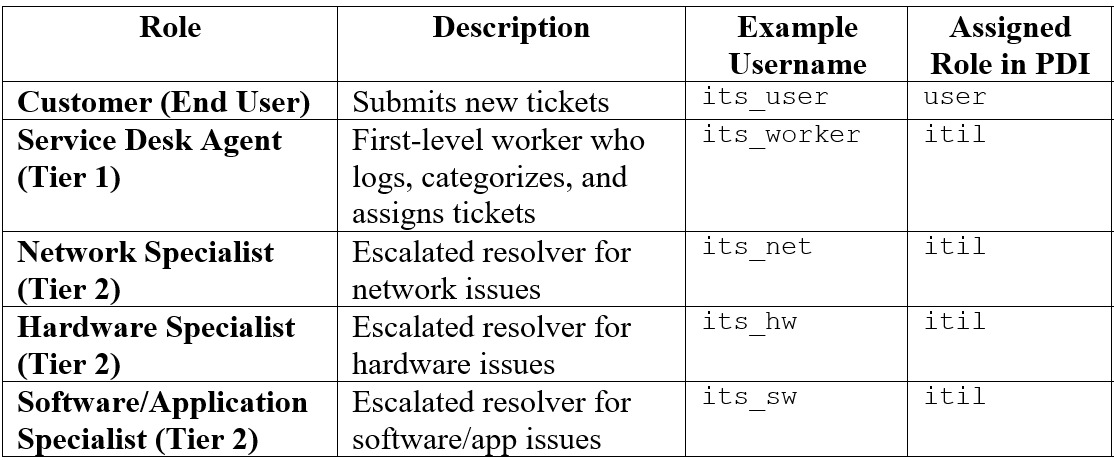
Our group consisted of three members and I am the group leader responsible for providing the shared PDI and managing user creation.
User and Role Details:
Data Selection and Preparation
We selected 15 records from the Kaggle IT incident dataset, distributed as follows:
- 5 Network-related issues (e.g., connection failures, router malfunctions)
- 5 Hardware-related issues (e.g., disk errors, printer faults)
- 5 Software/Application-related issues (e.g., login errors, app crashes)
Each record was mapped to:
- Short Description
- Detailed Description
- Category (Network / Hardware / Software)
- Urgency and Impact
- Suggested Assignment Group
We used Spreadsheets to preprocess the data and clearly assign each record to its ITIL category. Dataset: IT Incident Dataset.
Simulation Flow
Phase 1 — Customer Role
- Log in as its_user through the Service Portal (
/sp). - Submit 15 new incidents, each based on a Kaggle dataset record.
- Each incident included:
- Short Description: Key issue
- Description: Context and details
- Category: Network / Hardware / Software
- Verified all incidents appeared under My Incidents with status New.
Phase 2 — Service Desk Agent (Tier 1)
- Log in as its_worker (Platform UI).
- Navigate to Incidents → Open.
- For each incident:
- Review and confirm the correct category.
- Assign the incident to the correct Assignment Group:
- Network → Network Support Team
- Hardware → Hardware Support Team
- Software → Software Support Team
- Add Work Notes: “Ticket triaged, assigned to specialist.”
- Change State → In Progress and reassign to the appropriate specialist (
its_net,its_hw, orits_sw).
Phase 3 — Specialists (Tier 2)
Each specialist handled incidents related to their expertise:
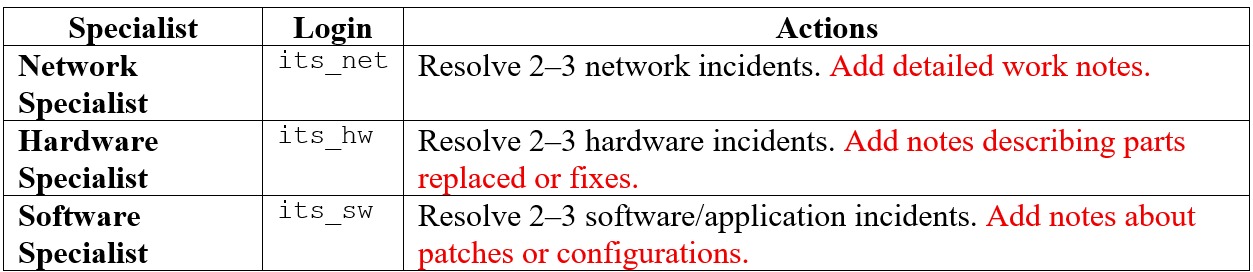
Each specialist updated the State → Resolved upon completion.
Phase 4 — Customer Confirmation
- Log back in as its_user.
- Check My Incidents to verify that resolved tickets were updated.
- Closed tickets after confirmation and added short comments such as “Thank you for the quick resolution.”
Workflow Diagram
Below is the BPMN workflow representing the ITIL ticket lifecycle across roles:

The workflow shows how incidents flow from the Customer (Tier 0) to Agent (Tier 1) and finally to Specialists (Tier 2) before being confirmed and closed by the Customer. This mirrors a standard ITIL incident management process with structured escalation and clear responsibility hand-offs.
Reflection
This lab provided a deeper understanding of collaborative IT service management and the importance of data-driven incident categorization. By using real data from Kaggle, we learned how ITIL frameworks can be applied to actual IT operations rather than theoretical cases. Simulating multi-tier ticket handling highlighted how escalation paths improve efficiency and service quality. The exercise also demonstrated how structured role assignments and clear documentation can enhance communication between IT teams and end-users. Through this lab, we connected data analytics, workflow automation, and service management into one integrated experience, reflecting real-world IT operations in enterprise environments.
Lab Report PDF
For a detailed breakdown of the activity, refer to the PDF Lab Report embedded below: